Trade show lead capture, done digitally
With MyTaag, your booth team captures trade show leads right on their digital business cards: visitors tap the NFC card or scan the QR code and enter their own details in the lead form. A campaign for each show then tells you what your presence delivered, and the built-in CRM takes care of the follow-up.
- Made in Germany
- Servers in Germany
- Compliant with EU regulations
- As seen on the German version of Shark Tank
Why trade show leads so often go nowhere
A trade show costs booth space, travel and many working days. Its value is created in the conversations at the booth – and is often lost afterwards. Business cards pile up in bowls, notes end up on lead sheets, in notebooks and on phones. After the show, someone types it all in, days later, with gaps and typos. By the time the first follow-up goes out, the visitor has already talked to three other vendors.
On top of that, it's hard to say whether the show was worth it. How many contacts were there really? Who on the team had which conversations? And what happened to the leads?
MyTaag connects the three phases of a trade show in one tool: prepare, capture, follow up – and measure at the end.
Before the show
Before the show: form, scheduled content, campaign
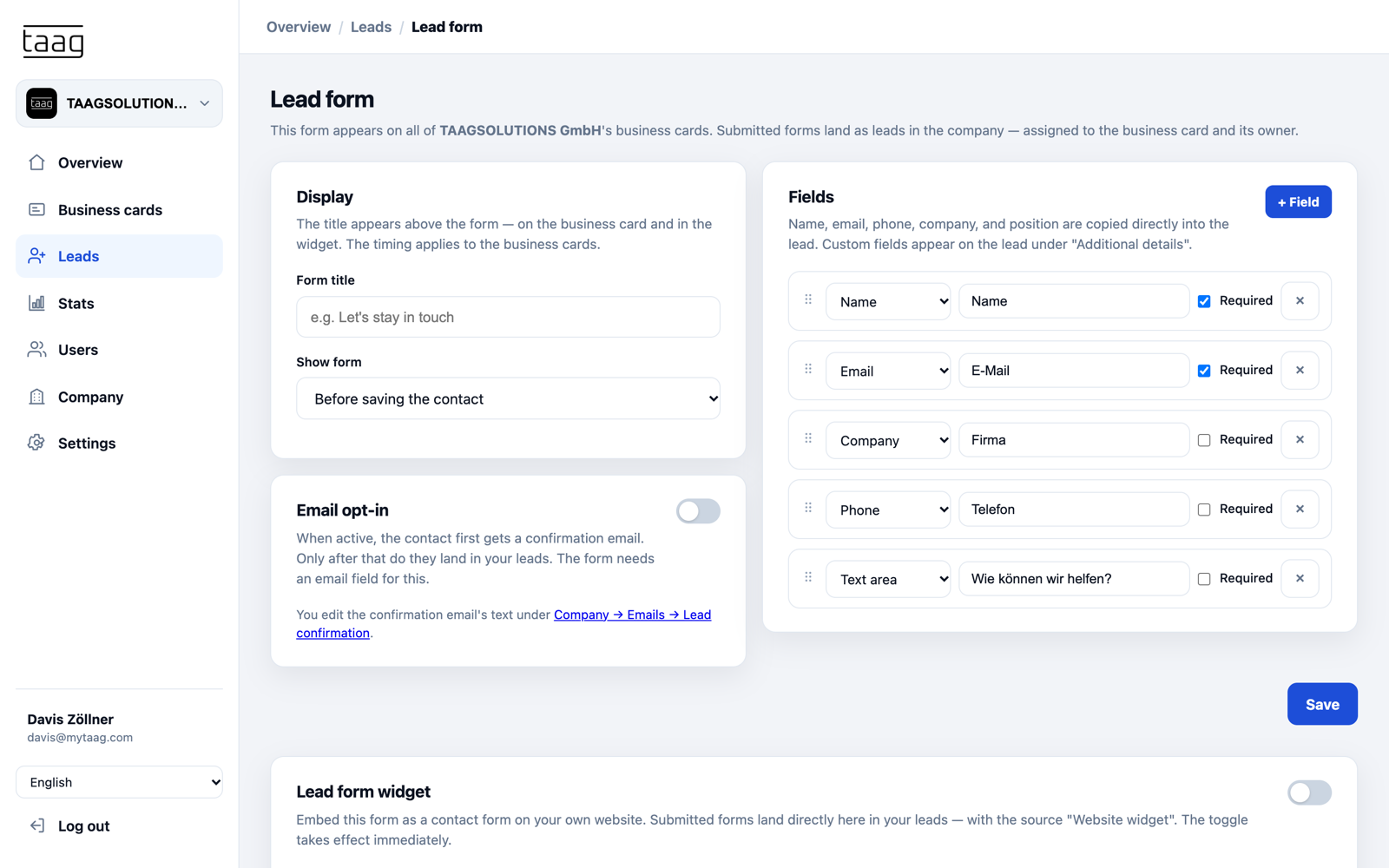
The best lead capture starts weeks before the doors open. Decide which details you need at the booth and set everything up so your team only has to share.
- Tailor the lead formPick the fields that matter to your sales team – name, email, company, job title, phone and, for example, "How can we help?". Choose whether the form appears before or after "Save contact".
- Scheduled contentA link to your show offer, your hall and booth number or a booking button for the show days: schedule the fields in advance and they go live automatically on the date you set.
- Create a campaignSet up a campaign with the date range and your booth team's business cards, for example "Trade fair Munich 2026" from September 13 to 17.
- A lead group for the showA dedicated group per show keeps the contacts together and separate from other leads.
At the booth
At the booth: NFC, QR code, Wallet and form
At the booth, speed is everything. A visitor has two minutes, and your team wants to have the conversation, not fill in forms. With MyTaag you swap contacts in seconds – in both directions.
- Tap the NFC cardHold the NFC business card to the visitor's phone – the business card opens without an app.
- QR code on the roll-upA dynamic QR code on the counter, roll-up banner or screen also reaches visitors who aren't talking to you right now.
- Wallet as a backupNo NFC card at hand? The QR code from Apple Wallet or Google Wallet works just as well.
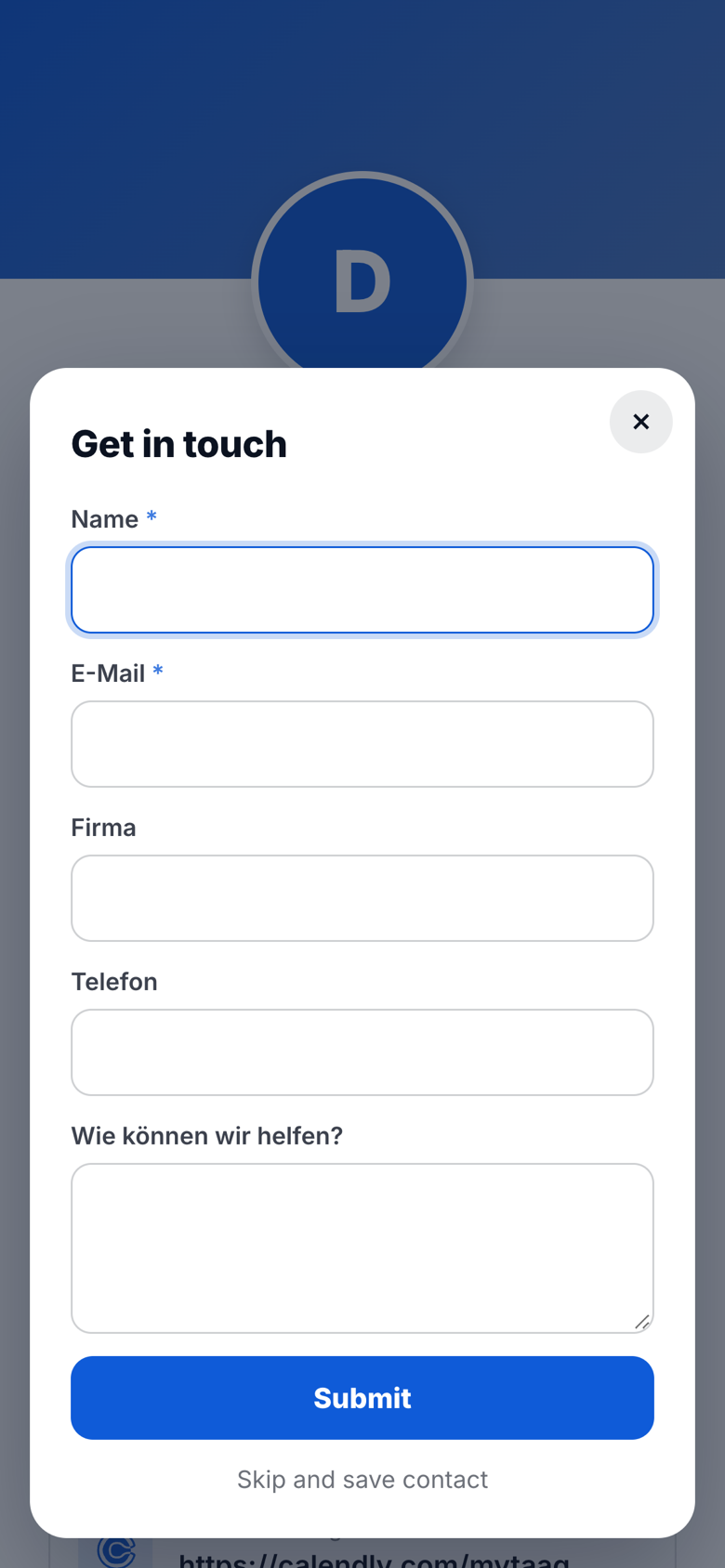
- Lead formVisitors enter their own details – with consent and without typos. The lead is linked to the person who shared the card.
- Scan paper cardsHanded a paper card after all? Scan it in the MyTaag app.
After the show
After the show: email templates, pipeline, tasks
The first days after the show decide everything. Because all leads are already in MyTaag, the follow-up starts right away – not after the typing is done.
- QualifyAdd labels like "Hot" or "Call back" and decide who owns each lead.
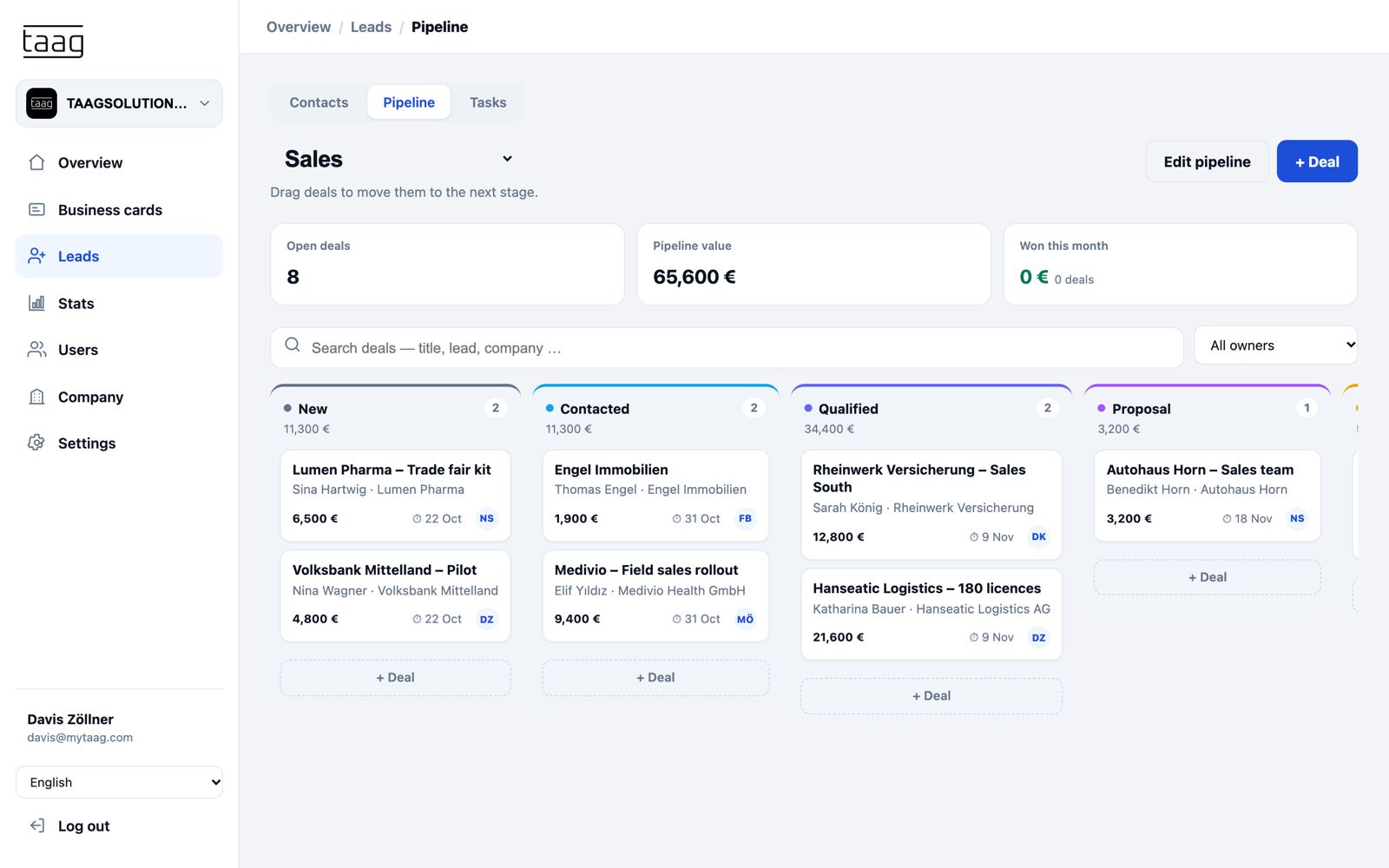
- Into the pipelinePromising leads become deals in the built-in CRM, with stages and a deal value.
- TasksCallbacks, quotes and meetings as tasks with due dates and owners – nobody forgets a contact.
- Email templates and sharingSystem emails like the opt-in confirmation go out in your own voice. Share leads with colleagues by email, vCard included.
- ExportUsing another CRM? Export your trade show leads as CSV or Excel.
Trade show ROI
Measure trade show ROI with analytics
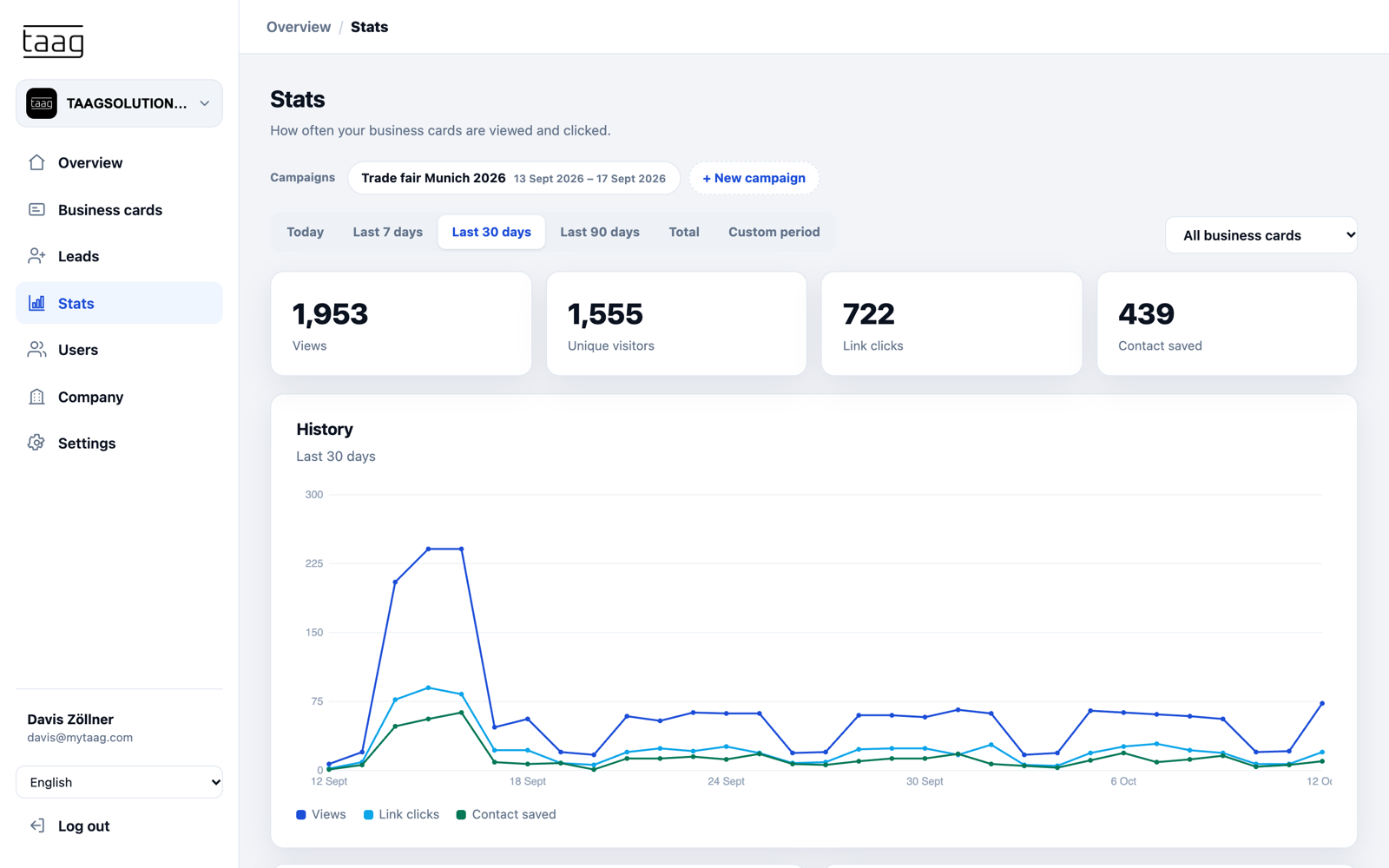
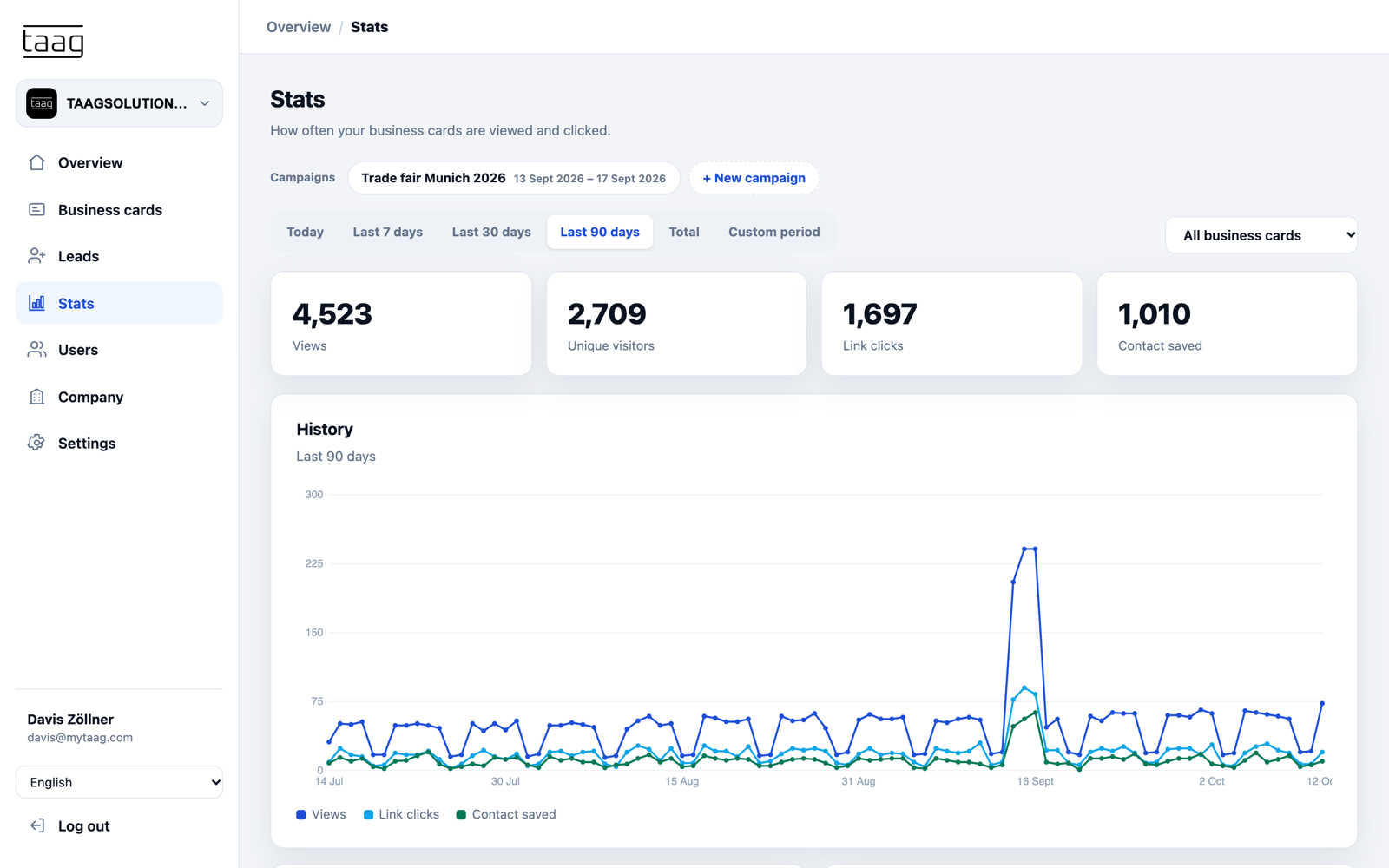
The "Trade fair Munich 2026" campaign bundles the date range and your booth team's business cards. One click shows you views, unique visitors, link clicks and saved contacts for the show days – for the whole team or individual business cards, with the trend across all days.
Together with the lead group and the deals in your pipeline, that gives you a clear picture: how many contacts were made, how many became leads, and which deals came out of them? With one campaign per show, you compare events and make an informed decision about where to exhibit next year.
Paper lead sheets or MyTaag?
| Paper and a business card bowl | MyTaag | |
|---|---|---|
| Capture | Handwritten, typed in later | Visitors enter their own details |
| Consent | Collected separately | In the form, with optional double opt-in |
| Attribution | Unclear who had the conversation | Lead belongs to the booth team member's business card |
| Follow-up | After typing everything in | Immediately, with tasks and pipeline |
| Reporting | Counting sheets | Campaign with views, clicks and saved contacts |
Checklist for your next trade show
Tick it off – before, during and after the show.
Before the show
- Set goals: which contacts do you want, and what information does sales need?
- Tailor the lead form: fields, required fields, timing and double opt-in if needed.
- Create a lead group for the show.
- Create a campaign with the date range and your booth team's business cards.
- Set up scheduled content, such as your show offer or booth number from the first day.
- Link NFC cards to your booth team's business cards and order new cards in time from the shop.
- Send Wallet cards to the team by email.
- Plan the QR code for the roll-up banner, counter and screen.
At the booth
- Share your business card via NFC, QR code or Wallet.
- Have visitors fill in the lead form – right during the conversation.
- Scan paper cards in the MyTaag app straight away.
- Label important leads while you're still at the booth.
After the show
- Qualify leads and assign owners.
- Create tasks for callbacks and quotes with due dates.
- Move promising leads into the pipeline as deals.
- Review the campaign and compare it with previous shows.
- Export leads as CSV or Excel if needed.
More on form fields, consent and the website widget on our page about lead capture.
Everything for your trade show presence
Especially trade-show-heavy: automotive and logistics & transport.
Lead form and widget
The same form at the booth and on the trade show landing page of your website.
Learn more – Lead form and widgetBuilt-in CRM
Pipeline, deals and tasks for the follow-up – no extra tool needed.
Learn more – Built-in CRMManage the booth team centrally
Business cards, NFC cards and permissions for everyone working the booth.
Learn more – Manage the booth team centrally31 languages
International visitors automatically see your business card in their device language.
Servers in Germany
Trade show leads are stored securely in Germany, with 2FA and permissions per area.
Campaigns
One campaign per show – compare results and plan your budget with purpose.
Trade show lead capture FAQ
Preparation, booth, follow-up and reporting – quick answers.
How do I capture leads digitally at a trade show?
Your booth team shares their digital business cards via NFC card, QR code or Wallet. A lead form appears on the business card and the visitor enters their details. The lead lands in MyTaag, linked to the booth team member's business card.
Do visitors need an app?
No. The business card and the lead form open in the visitor's browser. Your booth team only needs the NFC card or a phone with the Wallet card.
How do I see what the show delivered?
With a campaign: it saves the show's date range and your booth team's business cards. You see views, unique visitors, link clicks and saved contacts and can compare shows with each other.
Is lead capture at the booth GDPR-compliant?
The form includes consent and privacy notices, with optional email double opt-in. All data is stored on servers in Germany. More under privacy & security.
How does the follow-up work after the show?
You qualify leads with labels, assign owners and tasks, and move deals into the pipeline. Share leads by email with a vCard, or export them as CSV or Excel. More under lead capture.
What do I do with paper business cards at the booth?
Scan them in the MyTaag app. That way these contacts end up digitally with you instead of in the bowl.
Can I prepare trade show content in advance?
Yes, with scheduled content. A field such as the link to your show offer only appears from the date you set, for example the first day of the show – activation is automatic.
Your next trade show – with measurable leads
In the demo, we walk through a trade show with you: form, campaign, follow-up and reporting.