Digital business cards for teams and employees
With MyTaag, every employee gets a digital business card in your corporate design – and you manage every card centrally in one place. Import, brand rules, permissions, NFC cards and offboarding all run through one dashboard, hosted on servers in Germany.
- Made in Germany
- Servers in Germany
- Compliant with EU regulations
- As seen on the German version of Shark Tank
Teams at these companies connect with MyTaag






Why paper business cards fail in teams
As long as only one person needs business cards, paper is fine. In a company with sales, field staff, several locations and regular new hires, it quickly turns into a never-ending project: collecting print orders, going through proof rounds, shipping boxes – and starting all over after the next office move, the new extension number or the rebrand.
Then there’s what you can’t see: nobody knows who handed out which card, which contacts came out of it, or whether the details on the cards are still correct. Contacts end up on someone’s desk or in a personal address book instead of with the company. When someone leaves, the contacts leave too.
Digital business cards only solve this when they’re managed centrally. One app per person, each designed by its owner, simply swaps paper chaos for data chaos. That’s why MyTaag was built for companies from day one: one place decides how cards look, who can edit what, and what happens to contacts and cards when the team changes.
Paper, individual apps or a central platform?
Three ways to organize business cards across a team – and what each means day to day.
| Paper business card | Individual apps per person | MyTaag for teams | |
|---|---|---|---|
| Changes | Reprint | Each person on their own | Central, instantly for every card |
| Corporate design | Per print order | Hard to control | Inherited: company → group → card |
| New employees | Wait for the printer | Set it up themselves | Invitation or CSV/Excel import |
| Contacts and leads | On the desk | In a personal account | With the company, including CRM |
| Offboarding | Throw away leftovers | Data leaves with them | Reassign the card, leads stay |
| Analytics | None | Per person, if at all | Analytics per card and campaign |
| Security | – | Depends on the vendor | 2FA, permissions, servers in Germany |
How the rollout works
From the first login to a card in every employee’s pocket – in three steps.
Set the design
Add your logo, banner, colors and font once for the company. Groups for departments or locations inherit them automatically.
Create the cards
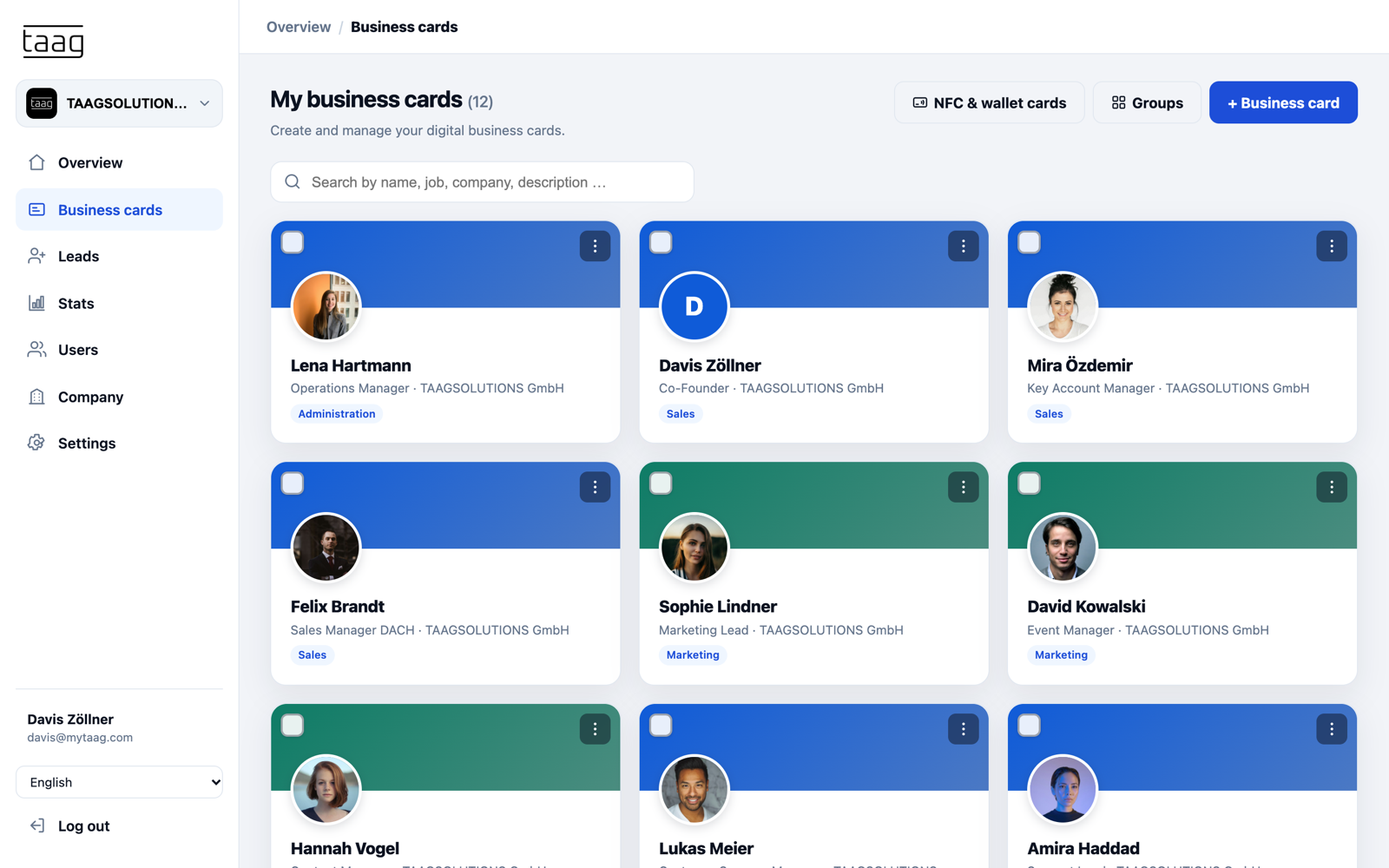
Invite employees by email, create many business cards at once with a CSV or Excel import – or import them from Azure Active Directory, for example.
Start sharing
Everyone receives their Wallet pass by email and, if you like, an NFC business card that you link in the dashboard.
After that it’s business as usual: you make changes centrally, leads land with the company, and analytics show which cards are in use. Questions about data protection during the rollout? See privacy & security at MyTaag.
Manage business cards centrally
Everything you need to run business cards across your team, in one place.
Rollout and import
CSV and Excel import instead of typing
With ten employees you can create every card by hand. With a hundred, you can’t. The CSV and Excel import brings in names, job titles, phone numbers and other fields in one go. Alternatively, invite colleagues by email so they can complete their own card – and resend the invitation if it got lost.
- Automatically from AzureImport your employees from Azure Active Directory, for example, so business cards are created automatically when someone joins.
- Groups for departments and locationsAssign cards to groups such as “Sales Hamburg” or “Service South”. Groups control design and content.
- Multiple companies in one accountManage a holding, subsidiaries or brands separately – with a single login.
Corporate design
Brand rules: company, group, card
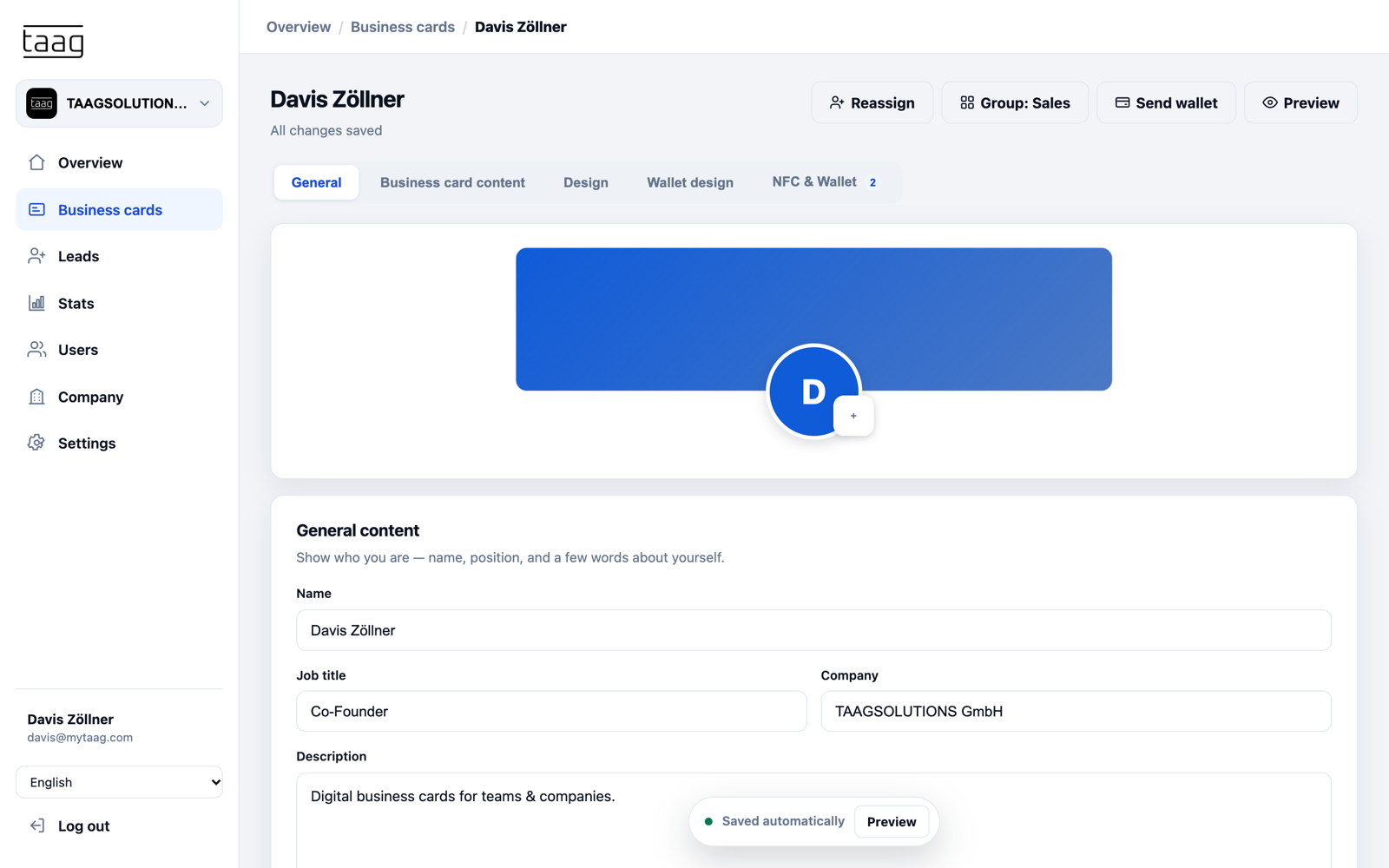
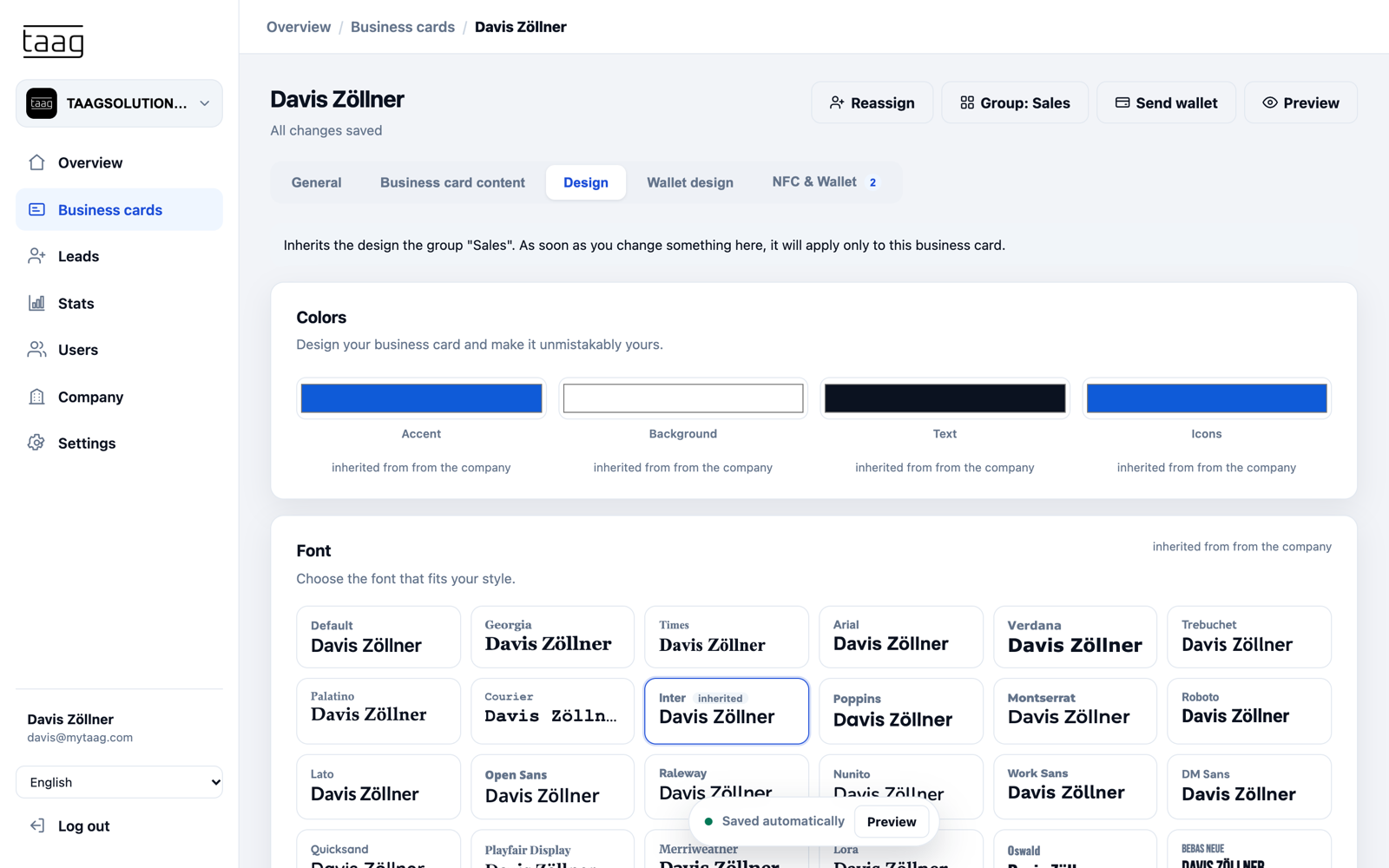
Design flows from the top down. Whatever you set for the company – logo, banner, colors and one of more than 30 fonts – applies to every group and every business card. A group can deliberately deviate, such as a location with its own banner or a sub-brand with its own colors. An individual card can deviate too, when it really has to.
MyTaag only stores the values that actually differ. If you change the company color later, every card that hasn’t deliberately overridden it follows along. Your brand stays consistent without touching each card individually.
- Global contentMaintain the company address, website or company profiles once for every business card.
- Scheduled contentShow fields only from a certain date, such as the new phone number from January 1. Activation happens automatically.
- Wallet in your corporate designThe Wallet pass gets its own design for the company, group or card as well.
Roles, permissions, 2FA
Per-area permissions and two-factor sign-in
Not everyone on the team needs access to everything. In MyTaag you grant permissions separately for five areas: business cards, analytics, users, company and leads. Assistants maintain cards, sales works the leads, management sees analytics – and only a few people can change users and company settings.
- Two-factor authenticationSign in with a code sent by email. Turning it on or off requires a code too.
- Secure password changesPasswords can only be changed via an email link, after which every device is signed out.
- Invitations only into your own companyNobody can bring outsiders into your company or pull employees into another account.
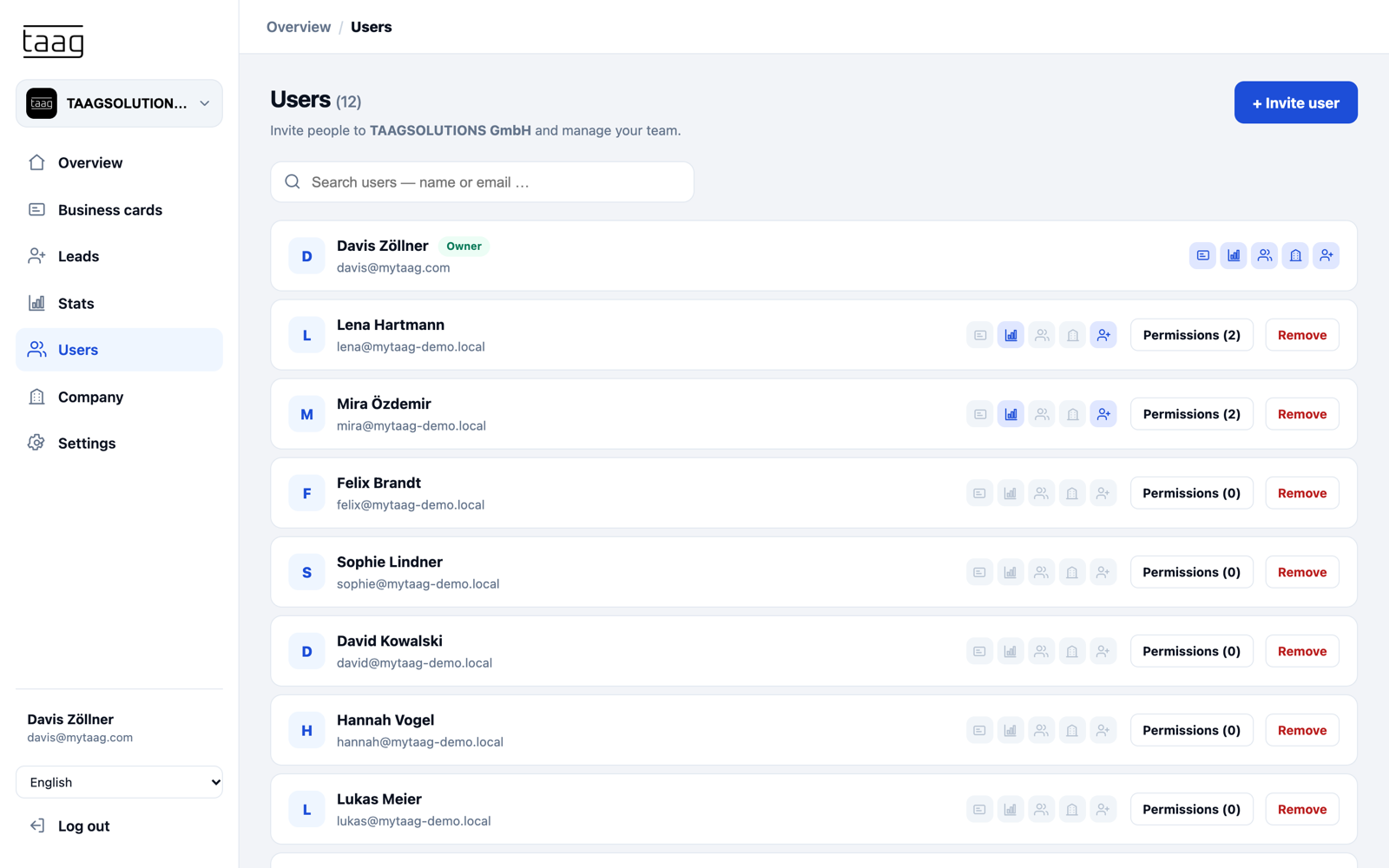
Which permissions are available
Grant permissions per person and per area – as fine-grained as your organization needs.
| Area | What the permission allows | Typically for |
|---|---|---|
| Business cards | Create, edit, assign and reassign business cards | Assistants, marketing, HR |
| Analytics | View views, visitors, link clicks, saved contacts and campaigns | Sales leadership, management |
| Users | Invite employees, resend invitations, remove users | HR, IT |
| Company | Maintain company details, design and global settings | Marketing, admins |
| Leads | View, edit and export leads and work them in the CRM | Sales, key accounts |
NFC card management
Manage NFC cards centrally
Physical NFC cards are handy – as long as it’s clear who has which one. In MyTaag you see every NFC card in your company in a single list. You link each card to a business card, reassign it when it changes hands, and unlink it when a card should no longer be used. For every card you see how often it has been scanned.
Order new cards for your team in the MyTaag shop. How the technology works is explained on the page about NFC business cards for teams.
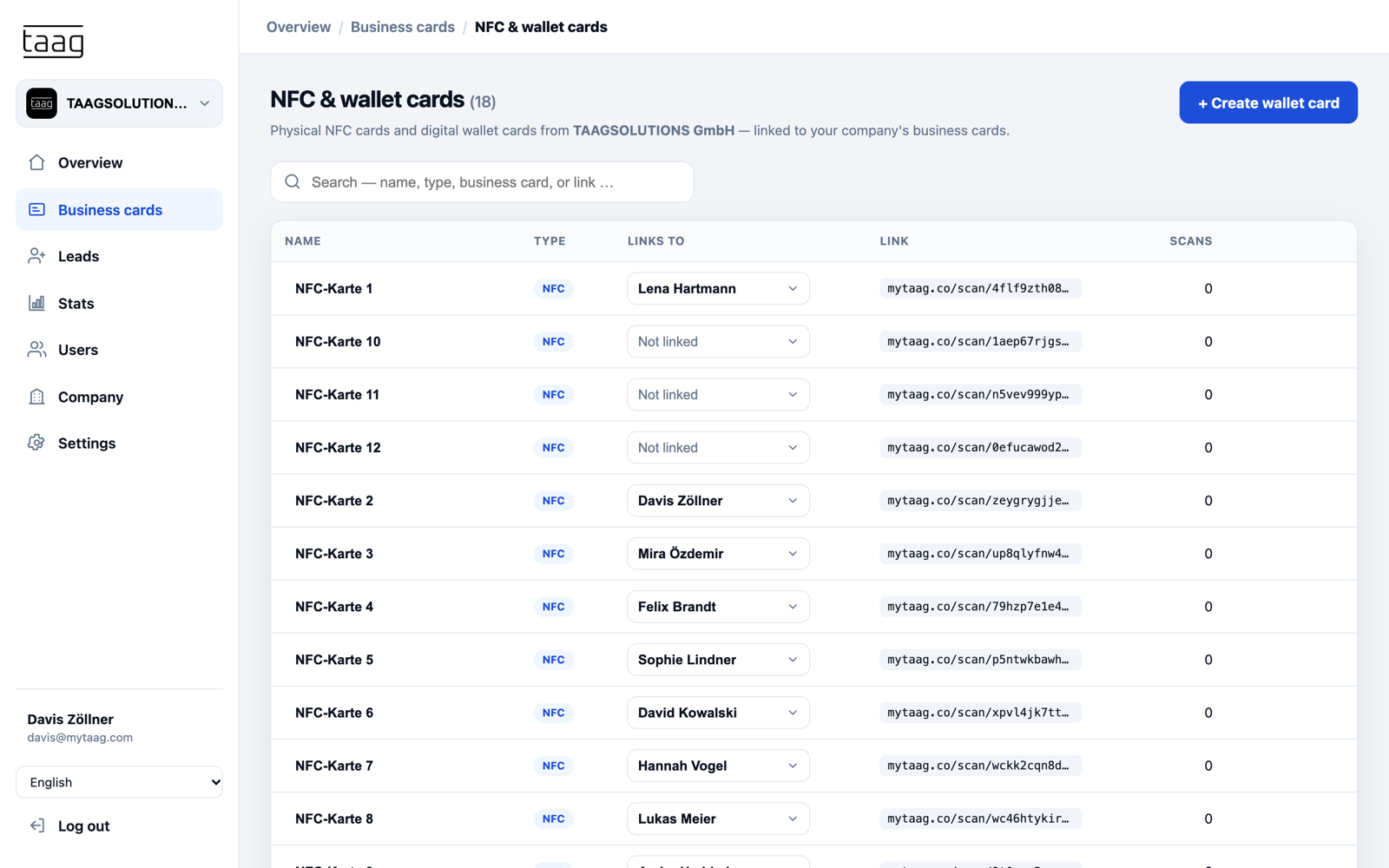
Onboarding and offboarding without losing data
Onboarding: A new colleague starts on Monday? Invite her by email or create her card in advance – the design comes automatically from company and group. On day one she receives her Wallet pass by email and can share her contact right away, with no waiting for the printer.
Moving within the team: When someone changes departments, you move their card to another group. Design and shared content adapt, and the personal card stays intact.
Offboarding: When someone leaves the company, you reassign their business card to a successor. When removing the user, you decide whether business cards and devices are kept. Leads belong to the company, not the person – so no contacts are lost, and no NFC card leads to someone who isn’t there anymore.
Measure success across the team
Whether digital business cards pay off for your team shows in how they’re used. MyTaag analytics show, for every business card, how often it was viewed, how many unique visitors there were, which links were clicked and how often contacts were saved. You pick the time range and see the most popular links.
For trade shows, roadshows or sales campaigns, you save a campaign: a time range plus the business cards that were in use. That lets you compare events and see where your team makes the most connections. What that looks like at an event is shown on the page about trade show lead capture.
What else teams get
From first contact to closed deal – the same for every employee, and centrally controlled.
31 languages
The app and business cards are available in 31 languages, automatically based on device language – including Arabic with right-to-left layout. Ideal for international teams.
Leads belong to the company
The lead form on every business card captures contacts with consent. Labels, groups and owners keep things organized.
Learn more – Leads belong to the companyBuilt-in CRM
Pipelines with stages, drag-and-drop deals, tasks with due dates – no extra tool needed.
Learn more – Built-in CRMCustom email templates
Write invitations, Wallet delivery and opt-in emails in your own voice – your team gets messages in your company’s style.
Analytics per card
Views, unique visitors, link clicks and saved contacts for every business card, and as a campaign for trade shows.
Servers in Germany
Developed and hosted in Germany, compliant with EU regulations. More under privacy & security.
For teams in every industry
Especially popular in banking & finance with many advisors, and in insurance with large field sales teams.
Frequently asked questions about digital business cards for teams
Rollout, permissions, design and offboarding – answered briefly.
How does every employee get a digital business card?
Invite them by email or create all cards at once with a CSV or Excel import. You can also import employees from Azure Active Directory, for example. Every card automatically inherits design and shared content from the company and its group.
Can employees edit their own card?
That’s up to you. Per-area permissions decide who can edit business cards. Company brand rules stay in place unless you allow deviations at group or card level.
What happens to the business card when someone leaves the company?
You reassign the business card or remove the user. When removing them, you decide whether business cards and devices such as NFC cards are kept. All collected leads stay with the company.
How do I keep our corporate design consistent?
Through design inheritance: you set logo, banner, colors and font for the company, and groups and cards inherit them. Deliberate deviations are possible and are only stored when they actually differ.
How secure is MyTaag for companies?
MyTaag runs on servers in Germany, protects sign-in with two-factor authentication via email code and separates permissions by area. Invitations are only possible into your own company. Details on the privacy & security page.
What can an employee business card contain?
More than 40 field types, such as phone, email, address, website, LinkedIn, XING, Instagram, WhatsApp, Calendly, PayPal, Spotify and files such as a PDF. Shared content like the company address is maintained once as global content for every card, while each person – or the admin team – adds personal fields. Custom fields can have custom icons.
How much effort is the rollout?
The effort depends mostly on team size and your internal approvals, not on the technology. You set up design and global content once, and the cards are created by import or invitation. In the demo we walk through the rollout for your company together.
Does every employee need an NFC card?
No. Sharing also works via QR code, link, email signature and Apple & Google Wallet. NFC cards are an add-on that you order in the shop and manage centrally.
Roll out digital business cards across your whole team
In the demo we show you import, brand rules, permissions and NFC card management using your own example.